If you’ve ever spotted a tiny orange dot at the top corner of your iPhone screen, you might have wondered what it means. This curious dot, seemingly innocuous yet somewhat concerning, has left many users puzzled and a tad bit worried.
iPhone Myth vs. Reality
The rumor mill has spun tales about this dot being a sign that someone is secretly listening in on your conversations, sending shivers down spines and causing alarm. However, the truth isn’t as sinister as the myths circulating on social media would have you believe.1
In 2020, with the release of iOS 14, Apple introduced these colored indicators as a security measure.2 The orange dot is a signal that an app is currently using your iPhone’s microphone. Similarly, its green counterpart indicates an app utilizing either the camera or both camera and microphone functionalities.
Contrary to the sensational claims, the appearance of the orange dot doesn’t automatically mean someone is eavesdropping on your conversations. Instead, it simply denotes an app using the microphone. It could be a social media platform or a messaging app that requires access to the mic for its functionality.
Should the orange dot make you uneasy, you have the power to manage app permissions on your iPhone.3 Head to Settings, navigate to Privacy and Security and select Microphone. From there, you can choose which apps have access to your microphone and revoke permissions for those you’re uncomfortable with.
Managing iPhone’s Orange Dot
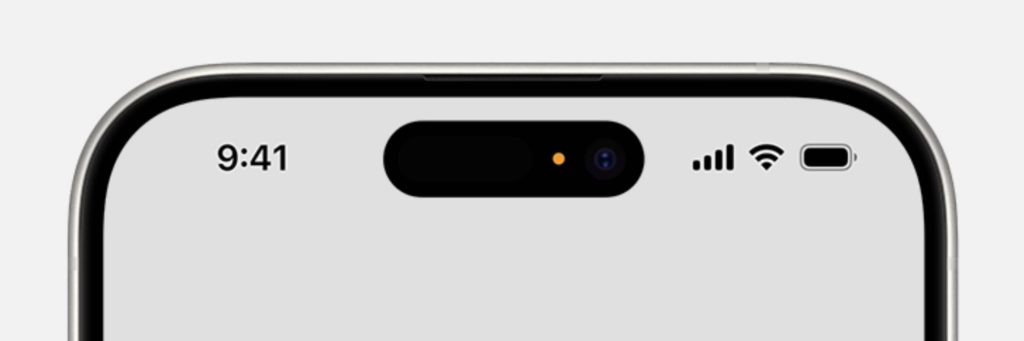
Step 1: Investigate the Culprit
Swipe down from the upper right corner of your screen to access the Command Center. If an app was recently using your microphone, a notification will appear at the top. Tap on it to identify the app responsible for the dot.
Step 2: Take Control in Settings
If you find an app that you’re uncomfortable granting microphone access to, it’s time to make a change. Navigate to iPhone’s Settings, then Privacy, and choose Microphone. Here, you can review which apps have requested access to your microphone and toggle permissions accordingly.
Step 3: Adjusting Accessibility Settings
For those who find the orange dot intrusive or confusing, there’s an option to switch its appearance to a square. Head to Settings, tap on Accessibility, then Display & Text Size. Toggle on “Differentiate Without Color” to change the orange dot to a square shape.
Extra iPhone Measures for Peace of Mind
Remember, this isn’t just about the orange dot – it’s about ensuring you’re comfortable with how your apps use your device’s features. If you’re worried about camera access, the green dot, or general app permissions, follow the same steps in Privacy settings to manage access to your camera and other functionalities.
Ultimately, your iPhone puts the power in your hands when it comes to managing app permissions. Whether it’s the microphone, camera, or other data collection, you have the authority to allow or deny access as you see fit.
The appearance of the orange dot on your iPhone is not a cause for panic. Armed with knowledge about its meaning and armed with the ability to manage app permissions, you can navigate your device’s privacy landscape with confidence.
Understanding the orange dot’s purpose empowers you to make informed decisions about your privacy settings. It’s not a red flag for imminent danger but rather a cautionary signal that an app is accessing your microphone. By staying informed and managing your app permissions, you can wield control over your iPhone’s privacy and use it with confidence.
- “Millions of iPhone users warned of new ‘quishing’ scam that could leave your wallet empty.” Unilad Tech. Rebekah Jordan. December 12, 2023.
- “What do the orange, green dots on my iPhone mean?” The Hill. Addy Bink. Mar. 03, 2023
- “Fact or Fiction: Orange dot on iPhone means you’re secretly being listened to?” 10News. Michael Rozzen. January 10, 2023.
