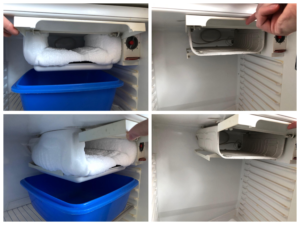
How to Defrost Your Fridge Freezer and When to Do It
Defrosting your fridge freezer is an essential maintenance task that ensures your appliance runs efficiently, prolongs its lifespan, and keeps your food in optimal condition. Regular defrosting prevents ice build-up, which can affect the appliance’s performance and increase energy consumption. This guide will walk you through the steps to defrost your fridge freezer and provide tips on the ideal timing for the process.
Why Defrosting is Important
Over time, ice can accumulate in your fridge freezer, especially if it lacks a self-defrosting feature. This build-up can reduce storage space and hinder the appliance’s ability to maintain consistent temperatures. Ice formation can also force the compressor to work harder, increasing energy bills and potentially shortening the unit’s lifespan. By defrosting your fridge freezer regularly, you can avoid these issues, ensuring it operates efficiently and effectively.
Signs It’s Time to Defrost
Knowing when to defrost your fridge freezer is key to maintaining its efficiency. Here are some signs that indicate it’s time to defrost:
- Thick Ice Build-up: If you notice more than a quarter-inch of ice on the walls or shelves of the freezer, it’s time to defrost.
- Reduced Storage Space: Ice can take up valuable space, leaving you with less room for food storage.
- Increased Energy Bills: A sudden spike in energy consumption can be a sign that your fridge is working harder due to ice build-up.
- Difficulty Closing the Door: If ice is preventing the door from sealing properly, it’s time to defrost.
How Often Should You Defrost?
The frequency of defrosting depends on the type of fridge freezer you own. Here are some general guidelines:
- Manual Defrost Models: Aim to defrost every three to six months or whenever you see a significant ice build-up.
- Frost-Free Models: These typically require defrosting once a year, but keep an eye out for any ice accumulation.
- Older Models: If you have an older unit without automatic defrost, more frequent defrosting may be necessary.
Preparing to Defrost
Before you begin the defrosting process, make sure to prepare your fridge freezer and its contents:
- Empty the Fridge Freezer: Remove all food items and store them in a cooler or another fridge to keep them fresh.
- Unplug the Appliance: For safety reasons, always unplug your fridge freezer before starting the defrosting process.
- Remove Shelves and Drawers: Take out removable shelves, drawers, and trays to allow for easier cleaning and faster defrosting.
- Gather Supplies: You’ll need towels, a shallow pan or tray, and possibly a hairdryer to speed up the defrosting process.
Step-by-Step Defrosting Process
Follow these steps to defrost your fridge freezer efficiently:
- Turn Off the Appliance: As mentioned, unplug the fridge freezer to ensure safety and begin the defrosting process.
- Leave the Door Open: Open the freezer door to allow warm air to melt the ice naturally.
- Place Towels and a Tray: Lay towels on the floor to catch any dripping water, and place a tray under the freezer compartment to collect melting ice.
- Speed Up the Process: If you want to hasten the defrosting process, use a bowl of hot water or a hairdryer (on a low setting) to gently melt the ice. Be cautious not to use sharp objects to chip away ice, as this can damage the appliance.
- Clean the Interior: Once the ice has melted, wipe down the interior with a clean cloth and mild detergent. This is a great time to clean any shelves and drawers you removed earlier.
- Dry Thoroughly: Make sure the inside of the freezer is completely dry before turning it back on.
- Plug Back In and Restock: After the interior is dry, plug the appliance back in, allow it to cool, and then restock your food.
Maintaining Your Fridge Freezer
To minimize the frequency of defrosting, practice good fridge freezer maintenance:
- Check Seals Regularly: Ensure that the door seals are intact and not allowing warm air to enter.
- Avoid Overfilling: Don’t overcrowd your fridge freezer, as proper air circulation prevents ice build-up.
- Organize Smartly: Keep commonly used items in accessible locations to minimize the time the door stays open.
- Monitor Temperature: Use a fridge thermometer to maintain optimal temperatures (37-40°F for the fridge and 0°F for the freezer).
Defrosting your fridge freezer is a simple yet essential task that ensures your appliance operates efficiently, keeping your food fresh and your energy bills low. By following the steps outlined in this guide and maintaining a regular defrosting schedule, you can extend the lifespan of your fridge freezer and enjoy its optimal performance.
